





-
 Courier delivery

-
Official Brand Warranty (Check with Manufacturer)

-
3 Days DOA Replacement

Feature
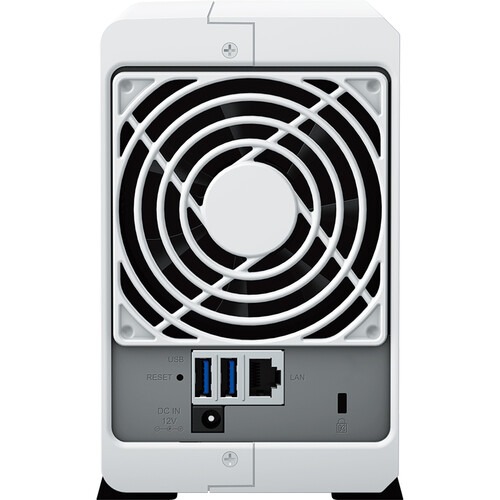
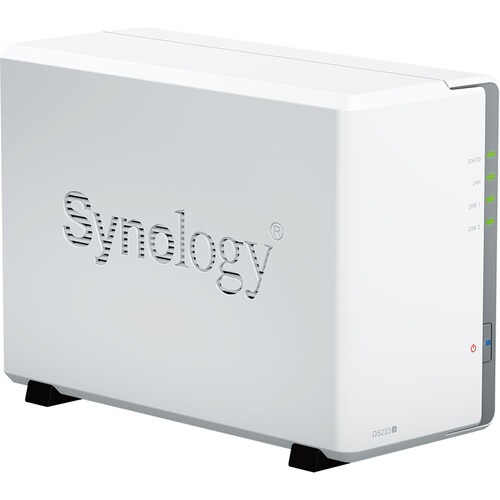
The DiskStation DS223j runs on Synology DiskStation Manager (DSM) OS, which is a browser-based operating system that helps to simplify managing your Synology NAS. Its CPU is a 1.7 GHz Realtek RTD1619B Quad-Core and its 1GB of DDR4 RAM allows frequently-used files and applications to be quickly accessed. Also featured are two USB-A 3.2 Gen 1 ports that allow it to be connected to external drives or other peripherals, and network connectivity is achieved via the integrated Gigabit Ethernet port, allowing your stored data to be shared with users throughout the network. The DS223j is also able to function as a multimedia solution for management, streaming, and playback.
For those who require RAID support, the DS223j supports RAID 0 and 1, as well Synology Hybrid RAID and Basic RAID, each of which offers performance, data redundancy, or a combination of both. For those who do not require a RAID, JBOD is also available, allowing each drive bay to be individually utilized. A 92 x 92mm fan helps keep the system running cool at all times and the server supports numerous scheduled power on / off cycles and hard drive hibernation to further minimize power consumption and operation expenses.
The Synology DiskStation DS223j 2-Bay NAS Enclosure operates on 100-240 VAC at 50/60 Hz and includes an accessory pack, an AC power adapter, an AC power cord, and an RJ45 LAN cable. It is protected by a limited 2-year warranty.
Built for sharing
DS223j is designed for small teams to share, sync, and collaborate more efficiently.
Multi-platform file access
Manage your files and media from anywhere with Synology Drive. Available on PC, Mac, Linux, Chromebook, Android, iOS, or any device equipped with a browser.

Real-time collaboration
Stay productive while working in a team or with your clients. Work together across different platforms using Synology Office.

Sync across sites
Keeping data synced between different sites has never been easier. Synology Drive ShareSync keeps files and folders synchronized across Synology systems.

Seamless synchronization to clouds
Sync files between your private cloud and public cloud storage platforms, including Google Drive, Dropbox, Microsoft OneDrive, and more with Synology Cloud Sync. Retain local copies of your cloud data to centralize management and achieve data ownership.
| Weight | 1 kg |
|---|---|
| Product Type | Normal |
| Color | White |
| Brands | Synology |
| Connector | USB 3.2, RJ45 |
| NAS Bays | 2 |
| EAN / UPC Code | 4711174724765 |
Specification
Hardware Specs
CPU | CPU Model | Realtek RTD1619B |
|---|---|---|
| CPU Quantity | 1 | |
| CPU Architecture | 64-bit | |
| CPU Frequency | 4-core 1.7 GHz | |
| Hardware Encryption Engine | ||
Memory | System Memory | 1 GB DDR4 non-ECC |
| Notes | Synology reserves the right to replace memory modules with the same or higher frequency based on supplier’s product life cycle status. Rest assured that the compatibility and stability have been strictly verified with the same benchmark to ensure identical performance. | |
Storage | Drive Bays | 2 |
| Compatible Drive Type |
| |
| Hot Swappable Drive* | – | |
| Notes | “Compatible drive type” indicates drives that have been tested to be compatible with Synology products. This term does not indicate the maximum connection speed of each drive bay. | |
External Ports | RJ-45 1GbE LAN Port | 1 |
| USB 3.2 Gen 1 Port* | 2 | |
| Notes |
| |
File System | Internal Drives |
|
| External Drives |
| |
| Notes | Btrfs file system is available from DSM 7.2-64570. | |
Appearance | Size (Height x Width x Depth) | 165 mm x 100 mm x 225.5 mm |
| Weight | 0.88 kg | |
Others | System Fan | 92 mm x 92 mm x 1 pcs |
| Fan Speed Mode |
| |
| Brightness Adjustable Front LED Indicators | ||
| Power Recovery | ||
| Noise Level* | 18.2 dB(A) | |
| Scheduled Power On / Off | ||
| Wake on LAN / WAN | ||
| Power Supply Unit / Adapter | 60 W | |
| AC Input Power Voltage | 100V to 240V AC | |
| Power Frequency | 50/60 Hz, Single Phase | |
| Power Consumption | 16.31 W (Access) 4 W (HDD Hibernation) | |
| British Thermal Unit | 55.62 BTU/hr (Access) 13.64 BTU/hr (HDD Hibernation) | |
| Notes |
| |
Temperature | Operating Temperature | 0°C to 40°C (32°F to 104°F) |
| Storage Temperature | -20°C to 60°C (-5°F to 140°F) | |
| Relative Humidity | 5% to 95% RH | |
Certification |
| |
Warranty | 2-year hardware warranty, extendable to 4 years with Extended Warranty Plus | |
| Notes | The warranty period starts from the purchase date as stated on your purchase receipt. | |
Environment | RoHS Compliant | |
Packaging Content |
| |
Optional Accessories |
| |
Software Specs
DSM Specifications | ||
|---|---|---|
Storage Management | Maximum Single Volume Size | 108 TB |
| Maximum Internal Volume Number | 64 | |
| Supported RAID Type |
| |
| RAID Migration | Basic to RAID 1 | |
| Volume Expansion with Larger HDDs |
| |
| Volume Expansion by Adding a HDD | Synology Hybrid RAID | |
| Notes |
| |
File Services | File Protocol | SMB/AFP/NFS/FTP/WebDAV |
| Maximum Concurrent SMB/AFP/FTP Connections | 100 | |
| Windows Access Control List (ACL) Integration | ||
| NFS Kerberos Authentication | ||
| Notes | The testing standard was based on the maximum number of concurrent connections supported by this model. During the testing, 25% of the connections were used to transfer files concurrently. The transfer process guaranteed that the connections were not interrupted; the minimum transfer speed was not guaranteed. | |
Account & Shared Folder | Maximum Local User Accounts | 1,024 |
| Maximum Local Groups | 256 | |
| Maximum Shared Folder | 256 | |
| Maximum Shared Folder Sync Tasks | 4 | |
Hyper Backup | Folder and Package Backup | |
Log Center | Syslog Events per Second | 200 |
General Specifications | Networking Protocols | SMB1 (CIFS), SMB2, SMB3, NFSv3, NFSv4, NFSv4.1, NFS Kerberized sessions, iSCSI, HTTP, HTTPs, FTP, SNMP, LDAP, CalDAV |
| Supported Browsers |
| |
| Supported Language | English, Deutsch, Français, Italiano, Español, Dansk, Norsk, Svenska, Nederlands, Русский, Polski, Magyar, Português do Brasil, Português Europeu, Türkçe, Český, ภาษาไทย, 日本語, 한국어, 繁體中文, 简体中文 | |
Add-on Packages view the complete package list | ||
Synology Chat | ||
Download Station | Maximum Concurrent Download Tasks | 80 |
SAN Manager | Maximum iSCSI Target Number | 10 |
| Maximum LUN | 10 | |
| LUN Clone/Snapshot, Windows ODX | ||
Media Server | DLNA Compliance | |
Synology Photos | Facial Recognition | |
Snapshot Replication | Maximum Snapshots per Shared Folder | 256 |
| Maximum of System Snapshots | 4,096 | |
| Notes | Snapshot Replication is available from DSM 7.2-64570. | |
Surveillance Station | Default Licenses | 2 |
| Maximum IP Cameras and Total FPS (H.264) |
| |
| Maximum IP Cameras and Total FPS (H.265) |
| |
| Notes |
| |
Synology Drive | Recommended Number of Concurrent Sync Clients | 200 (the number of connections that can be maintained when the recommended number of hosted files was reached) |
| Recommended Number of Hosted Files | 500,000 (applies to files indexed or hosted by Synology Drive. For file access through other standard protocols, refer to the File Services section above) | |
| Notes |
| |
Synology Office | Suggested Maximum Users | 500 |
| Suggested Concurrent Users | 200 | |
| Notes |
| |
Video Station | ||
VPN Server | Maximum Connections | 10 |
Synology DiskStation DS223J Network Attached Storage Drive (White)
Q & A
Synology DiskStation DS223J Network Attached Storage Drive (White)

Reviews
There are no reviews yet