

-
 Courier delivery

-
Official Brand Warranty (Check with Manufacturer)

-
3 Days DOA Replacement



Print Speed

Auto Feeder
Large jobs are done in a fraction of the time and user-related errors are minimized.
All that is needed is to program the ADF printer, insert a large volume of paper documents and walk away.
Printing is done in a fraction of the time allowing you to move on to other tasks.

Auto Duplex
Reduce paper and toner wastage with Brother’s duplex (two-sided) printing which reduce total operating costs and lower your overall cost per print.

Print From Any Where

Save More With Every Print
Brother helps Lower your cost per print with Brother’s Ultra High Yield Ink bottles. Print up to 15,000 pages in black (1 Black Ink Bottle) and 5,000 pages in colour.
Our affordable genuine ink ensures long-lasting machines and print heads, so you save more in the long run.

Best For Office Use
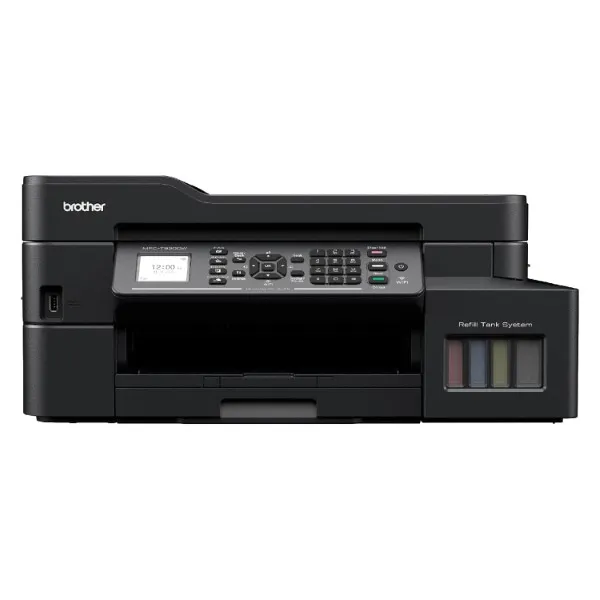
The MFC-T920DW is an excellent choice for business printing needs. With its versatile features, high-quality output, and efficient performance, it’s well-suited to meet the demands of modern businesses.
Specification
Specifications
| Specification | Details |
|---|---|
| Functions | Print, Scan, Copy, Fax |
| Printer Type | Inkjet Printer |
| Product Dimensions (Width X Depth X Height) | 435 mm × 439 mm × 195 mm |
| Weight | 9.7 kg |
| Print Speed | 17.0/16.5ipm |
| Paper Type | Plain, Inkjet, Glossy(cast/resin), Recycled |
| Paper Size | A4, Letter, Executive, A5, A6, Photo 4″x6″, Indexcard 5″x8″, Photo 5″x7″, C5 Envelope, Com-10, DL Envelope, Monarch, Photo-3.5″x5″ |
| Maximum Paper Capacity | 230 sheets (80 gsm, plain paper) |
| Print Resolution | Up to 1,200 x 6,000 dpi |
| Borderless | A4, Letter, Executive, A5, A6, Photo 4″x6″, Indexcard 5″x8″, Photo 5″x7″, Photo-3.5″x5″ |
| 2-Sided (Duplex) – Printing Paper Type | Plain, Recycled |
| 2-Sided (Duplex) – Paper Size | A4/Letter/Executive/A5 |
| Paper handling – Tray #1 – Paper Type | Plain, Inkjet, Glossy(cast/resin), Recycled |
| Paper handling – Tray #1 – Maximum Paper Capacity | 150 sheets (80 gsm, plain paper) |
| Paper handling – Multi-purpose Tray – Paper Type | Plain, Inkjet, Glossy(cast/resin), Recycled |
| Paper handling – Multi-purpose Tray – Maximum Paper Capacity | 80 sheets (80 gsm, plain paper), 20 sheets (220 gsm, glossy paper) |
| Automatic Document Feeder (ADF) Maximum Paper Capacity | 20 pages (80 gsm, plain paper) |
| Paper Output | Up to 50 sheets (80 gsm, plain paper) |
| Copy Colour / Monochrome | Yes |
| Multiple Copies | Up to 99 pages |
| Copy Resolution | Print: Max. 1200×2400 dpi, Scan: Max. 1200×600 dpi |
| Scan Resolution – Interpolated | Up to 19200×19200 dpi with Scanner Utility (For Window 7/8/10 only) |
| Scan Resolution – Scanner Glass | Up to 1,200 dpi x 2,400 dpi |
| Scan Resolution – Automatic Document Feeder (ADF) | Up to 1,200 dpi x 600 dpi |
| Fax Compatibility | ITU-T Super Group 3 |
| Fax Modem Speed | 14,400 bps |
| Fax Memory Transmission | Up to 170 pages |
| Fax Out of Paper Reception | Up to 170 pages |
| PC Fax – Sending | Yes (Network/USB, Up to A4) |
| PC Fax – Receiving | Yes (Network/USB, Up to A4) *NA for Mac |
| Connectivity | Hi-SpeedUSB2.0, Ethernet 10Base-T/100Base-TX, Wireless LAN IEEE 802.11b/g/n (Infrastructure Mode), IEEE 802.11g/n (Wi-Fi Direct) |
| Wireless Network Security | SSID (32 characters), WEP 64/128bit, WPA-PSK(TKIP/AES), WPA2-PSK(TKIP/AES) |
| Wireless Setup Support Utility – WPS | Yes |
| Display Type | 1.8″ TFT |
| Memory Capacity | 128MB |
| Power Source | AC 220 – 240V 50/60Hz |
| Power Consumption – Ready | Approx. 4W |
| Power Consumption – Sleep | Approx. 1.2W |
| Power Consumption – Power Off | Approx. 0.2W |
| Noise Level | Approx 53.5dB (A) |
| Supported OS | Windows® 7 SP1/8.1/10 Server 2008/2008 R2/2012/2012 R2/2016/2019, macOS v10.13.6/10.14.x/10.15.x (For printing and scanning from Mac, use AirPrint or download iPrint&Scan from Mac App Store. Mac driver is not provided.) |
 Brother MFC-T920DW Ink Tank Printer
Q & A
Brother MFC-T920DW Ink Tank Printer

Reviews
There are no reviews yet